Problem Solving and Programming using C
Assignment-1
Problem solving is a systematic and scientific process used to find a solution to a given problem using logical reasoning and computational methods.
Steps Involved:
- Problem Identification:
Clearly define the problem. Identify what needs to be solved. - Understanding the Problem:
Here we try to understand the problem to be solved in totally. Before with the next stage or step, we should be absolutely sure about the objectives of the given problem. - Analyzing the Problem:
After understanding thoroughly the problem to be solved, we look different ways of solving the problem and evaluate each of these methods. The idea here is to search an appropriate solution to the problem under consideration. The end result of this stage is a broad overview of the sequence of operations that are to be carries out to solve the given problem. - Developing the Solution:
Here the overview of the sequence of operations that was the result of analysis stage is expanded to form a detailed step by step solution to the problem under consideration. - Coding and Implementation:
The last stage of the problem solving is the conversion of the detailed sequence of operations in to a language that the computer can understand. Here each step is converted to its equivalent instruction or instructions in the computer language that has been chosen for the implantation.
Conclusion: Problem solving requires logical thinking, planning, designing, coding, and testing to obtain correct and efficient results.
A set of sequential steps usually written in Ordinary Language to solve a given problem is called Algorithm.
Definition:
An algorithm is “a complete, unambiguous, finite number of logical steps for solving a specific problem.”
Characteristics of Algorithm:
- It may be possible to solve to problem in more than one ways, resulting in more than one algorithm
- Thechoice of various algorithms depends on the factors like reliability, accuracy and easy to modify.
- The most important factor in the choice of algorithm is the time requirement to execute it, after writing code in High level language with the help of a computer.
- Thealgorithm which will need the least time when executed is considered the best
Steps in Algorithm Development:
- Step1: Identification of input: For an algorithm, there are quantities to be supplied called input and these are fed externally. The input is to be identified first for any specified problem.
- Step2: Identification of output: From an algorithm, at least one quantity is produced, called for any specified problem.
- Step3: Identification the processing operations: All the calculations to be performed in order to lead to output from the input are to be identified in an orderly manner.
- Step4: Processing Definiteness: The instructions composing the algorithm must be clear and there should not be any ambiguity in them.
- Step5 : Processing Finiteness : If we go through the algorithm, then for all cases, the algorithm should terminate after a finite number of steps.
- Step6 : Possessing Effectiveness : The instructions in the algorithm must be sufficiently basic and in practice they can be carries out easily.
Example:
Algorithm to find sum of two numbers:
- Start
- Read a, b
- c = a + b
- Display c
- Stop
A flowchart is a graphical representation of an algorithm using standardized symbols.
Aflowchart is a diagram made up of boxes, diamonds and other shapes, connected by arrows. Each shape represents a step of the solution process and the arrow represents the order or link among the steps
Advantages
- The flowchart shows the logic of a problem displayed in pictorial fashion which felicitates easier checking of an algorithm
- The Flowchart is good means of communication to other users. It is also a compact means of recording an algorithm solution to a problem.
- The flowchart allows the problem solver to break the problem into parts. These parts can be connected to make master chart.
- The flowchart is a permanent record of the solution which can be consulted at a later time.
| Symbol | Name | Purpose |
|---|---|---|
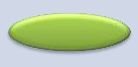 Oval |
Start/Stop (Terminator) | Indicates beginning or end of program. |
 Parallelogram |
Input/Output | Used for reading or displaying data. |
 Rectangle |
Process | Represents calculations or processing steps. |
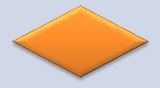 Diamond |
Decision | Represents conditional branching (Yes/No). |
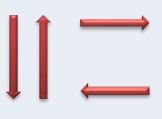 Arrow |
Flow Line | Shows direction of control flow. |
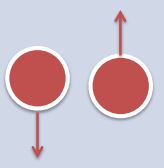 Circle with Arrow |
On-page Connector | Connects different sections on same page. |
 Square Pentagon |
Off-page Connector | Connects flow across pages. |
Advantages:
- Easy to understand logic
- Better communication tool
- Permanent documentation
- Helps debugging
A C program is organized into different sections to ensure clarity, modularity, and systematic execution. Each section has a specific purpose in the compilation and execution process.
Contains comments describing the program. Comments are ignored by the compiler.
Example:
                    /* Program to calculate area of a circle */
                    // Single line comment
Includes header files using #include directive.
                    #include <stdio.h>
                    #include <math.h>
Defines symbolic constants using #define.
                    #define PI 3.14159
                    #define MAX 100
Contains global variables and function prototypes.
                    int count;
                    void display();
The entry point of every C program. Execution begins from main().
                    int main() {
                        // statements
                        return 0;
                    }
Additional functions written by the programmer to perform specific tasks.
                    void display() {
                        printf("Hello World");
                    }
                    /* Documentation Section */

                    #include <stdio.h>      // Link Section

                    #define PI 3.14         // Definition Section

                    int count;              // Global Declaration
                    void display();         // Function prototype

                    int main()              // Main Function
                    {
                        display();
                        return 0;
                    }

                    void display()          // Sub Program
                    {
                        printf("Structure of C Program");
                    }
Operators are symbols used to perform operations on variables and constants. They are essential in performing arithmetic calculations, comparisons, logical decisions, assignments, and type conversions in C programs.
1. Arithmetic Operators
Used to perform mathematical calculations.
- + (Addition)
- - (Subtraction)
- * (Multiplication)
- / (Division)
- % (Modulus – remainder after division)
                int a = 10, b = 3;
                int sum = a + b;      // 13
                int diff = a - b;     // 7
                int prod = a * b;     // 30
                int div = a / b;      // 3
                int rem = a % b;      // 1
2. Relational Operators
Used to compare two values. These operators return 1 (True) or 0 (False).
- < (Less than)
- > (Greater than)
- <= (Less than or equal)
- >= (Greater than or equal)
- == (Equal to)
- != (Not equal)
                int a = 5, b = 10;
                int result1 = (a < b);   // 1
                int result2 = (a == b);  // 0
3. Logical Operators
Logical operators are used to combine multiple conditions.
- && (AND) – True if both conditions are true
- || (OR) – True if at least one condition is true
- ! (NOT) – Reverses the logical state
                int a = 5, b = 10;

                int result1 = (a < b && b > 5);   // 1
                int result2 = (a > b || b > 5);   // 1
                int result3 = !(a < b);           // 0
4. Assignment Operators
Used to assign values to variables.
- = (Simple assignment)
- += (Add and assign)
- -= (Subtract and assign)
- *= (Multiply and assign)
- /= (Divide and assign)
                int a = 10;

                a += 5;   // a = 15
                a -= 3;   // a = 12
                a *= 2;   // a = 24
                a /= 4;   // a = 6
5. Type Conversion
(A) Implicit Type Conversion:
Automatic conversion performed by the compiler.
                int a = 5;
                float b = a;   // int automatically converted to float
(B) Explicit Type Conversion (Type Casting):
Manual conversion performed by the programmer.
                int a = 5, b = 2;
                float result = (float)a / b;   // Output: 2.5
Type conversion ensures correct results, especially during division operations where integer division may truncate decimals.
PSPC – Unit 1 | Prepared by Dr.M.RajaRoy